Products and prices
Your catalog and pricing aligned between the store and the ERP.
Connect your PrestaShop store with Business Central and keep products, stock, orders and customers synced automatically.
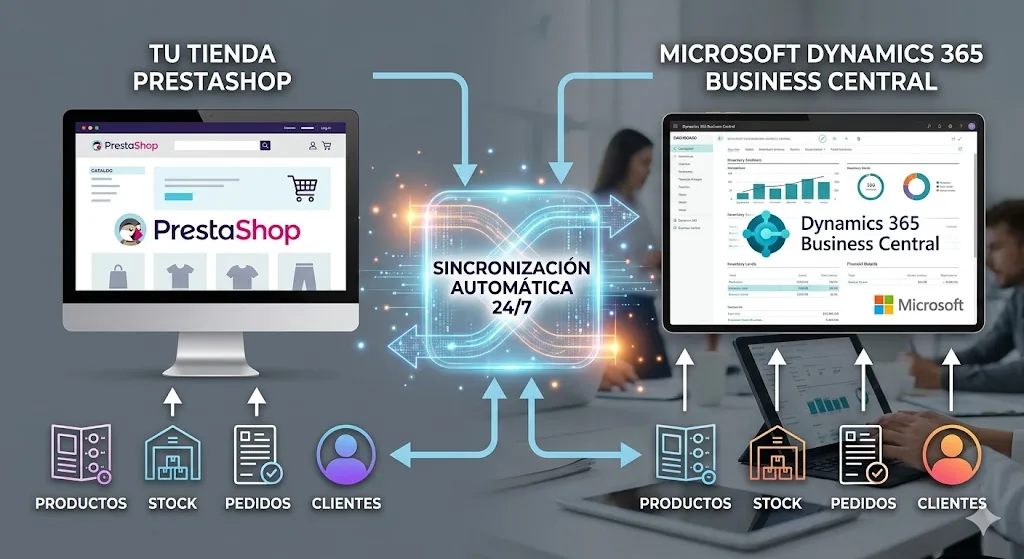
We integrate PrestaShop with Business Central so your e‑commerce and management work as one: catalog and stock up to date, automatic orders and invoicing with no manual work.
When the online store and the ERP run separately, the usual problems show up: stock that doesn't match, different prices in each place, orders that need re-entering by hand and duplicate customers. Integrating PrestaShop with Business Central eliminates that double work and those discrepancies.
With the integration, the catalog and pricing are managed from a single place, stock is reflected on the website as soon as it changes in the warehouse, and every PrestaShop order automatically becomes a sales order in Business Central, ready to pick and invoice.
Your catalog and pricing aligned between the store and the ERP.
Inventory updates instantly so you never sell out of stock.
PrestaShop orders flow straight into Business Central.
Customer data and invoices synced, with no duplicated work.
We analyze how you work today: what data needs to travel between the store and the ERP, in which direction and how often. Not every store needs the same thing, so the integration is configured to fit you.
Stock and price synchronization runs virtually in real time, so you never sell out-of-stock products or at outdated prices. Orders flow into Business Central as soon as they're confirmed in PrestaShop, with their lines, customer and shipping details.
We also define how special cases are handled: new customers, web-only products, returns or promotions. The goal is for your team to stop typing orders and focus on selling.
Mainly products and prices, stock levels, orders and customer data, although the exact scope is defined on each project based on how you work. For example, some companies keep the master catalogue in Business Central and push it to PrestaShop, to have a single source of truth for products and prices; others prefer to manage the catalogue in the store itself and only sync stock and orders with the ERP. It's also decided which direction each type of information flows: stock almost always flows from the ERP to the store (the real warehouse rules), while orders flow from the store to Business Central for management, picking and invoicing.
Stock and prices are synced almost in real time, because they're the data most sensitive to delay: a mismatch of just a few minutes can mean selling a product you no longer have, or showing a price that's no longer correct. Other data that's less time-critical — for example, updating product pages with new descriptions or images — can be scheduled in batches at set intervals if your operations allow it, since it doesn't have the same impact as a stock mismatch. We adjust the sync frequency for each type of data to what your business really needs, instead of applying the same rule to everything by default.
As soon as the order is confirmed, inventory in Business Central updates to reflect that sale, and that new availability syncs back to PrestaShop, so the quantity shown in the store stays consistent with what's really in the warehouse, also accounting for sales through other channels if you have them. This drastically reduces the risk of overselling — selling more units than actually exist because the stock shown in the store was out of date — one of the most common and most frustrating problems for customers when an online store isn't properly connected to the management system controlling real inventory.
Yes. The integration can cover several PrestaShop stores at once (for example, one per country or per brand), different languages within the same store, and different rates or price lists depending on the channel or customer type. Each of these variables adds complexity to the project — syncing one store with one language is not the same as syncing three stores each with several languages and separate pricing — so we analyse this in the initial phase of the project to size it correctly from the start, rather than discovering halfway through that the real scope was bigger than expected.
Generally, no. We work with your existing PrestaShop store, keeping its template, modules and current configuration intact; there's no need to redo or migrate anything you already have running. We only install and configure the module or connection needed to sync it securely with Business Central, without altering the visual look or the shopping experience your customers already know. The exception would be if your current PrestaShop installation is very old or has technical incompatibilities that prevent integration; in that case we'd tell you clearly from the initial analysis, rather than trying it and finding the problem halfway through the project.
A standard connector or a custom development? The question that actually decides is whether someone has already solved your exact case before.
Read articleOverselling happens when your stock lives in several disconnected systems. The fix isn't counting more often: it's having one single source of truth.
Read articleThe 6 points to check before your Verifactu deadline: from confirming the date to making sure your invoice history stays safe.
Read articleTell us about your project and we'll advise you with no commitment on Business Central, Power BI, Power Platform or Azure.
Request your personalized consultation